Coaches
Keep up with questions between sessions and give clients a place to find your next call.
MentorDrop Library
Upload your videos, group them into libraries and offer each library in the Spaces where your clients already ask their questions.
No card required.
Works with your existing website or platform
One video is in a folder, another is in an email, and the link to the last workshop is buried in the group chat. Bring them together so each group finds what it needs without asking you for the link again.
How it works
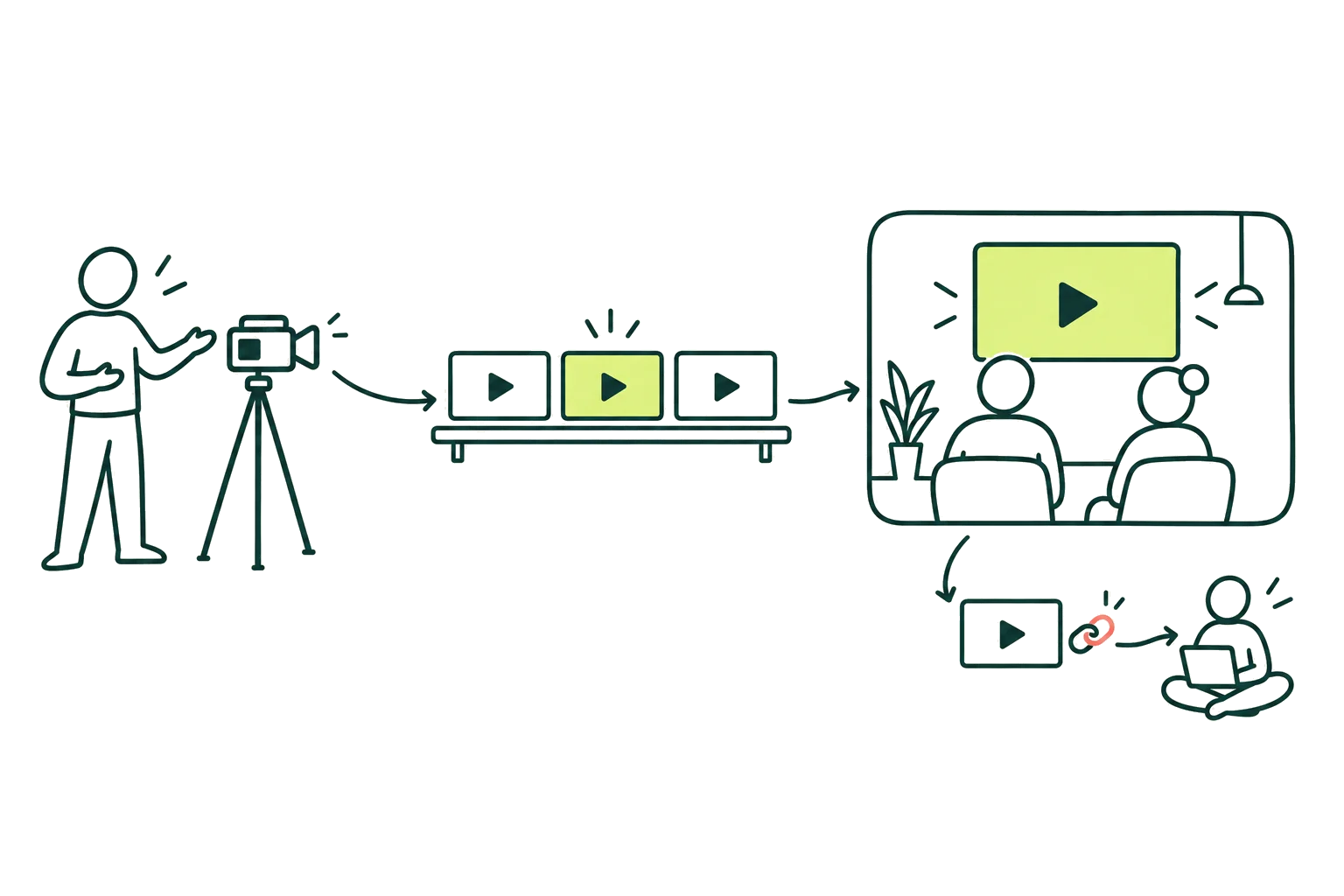
Choose the file and keep the page open while it uploads. MentorDrop prepares the video for every screen and shows it as ready when it can be played.
Collect videos in libraries and put them in the order you want them watched. A video can belong to several libraries without being uploaded again.
Choose which libraries each Space offers. Everyone with access to that Space sees them next to its Q&A sessions.
Clients enter with their email and a code, or with the access your course platform already gives them. When their access ends, so do the videos.
Where clients will watch
The libraries appear in the same Space as your questions and answers, on your MentorDrop page or inside the platform where your course lives.
Inside your course platform
Add the Space to a lesson in Kajabi, Hotmart or WordPress. Clients open the library and watch without leaving the lesson.
On your MentorDrop page
Send your clients the link to the Space. They sign in with their email and find the libraries it offers.
On its own public page
Share a video by link and hand its link, QR code or widget to anyone. If you like, ask people to subscribe to your emails to watch it (their name and email go straight to your Kit), set until when it plays and add a button to your offer.
For your clients, and public only when you decide
Videos are only for people with access to a Space until you share one by link: then anyone with the link can watch it, even if it is also in a paid library, until the date you set or until you turn the link off. Asking for an email needs your Kit account and your privacy policy. Each plan includes its own video storage, each file can be up to 4 GB, and playback is included, with a reasonable-use reference of hours watched per month: if your clients exceed it consistently we suggest the right plan, and playback is never cut. Player links expire, but they cannot stop someone who can watch from recording the screen.
For one person or a whole team
Coaches, mentors and experts working with clients, on their own or with a team. Tools to support that work, from the first conversation to the next program.
Keep up with questions between sessions and give clients a place to find your next call.
Share useful answers with the group and keep them available for future clients.
Learn what a potential client needs before the call, and turn useful explanations into articles more people can read.
Bring together the answers, upcoming sessions and videos that help your group keep learning.
Simple pricing
Start with the tool you need: Q&A, Events, Articles, Qualify, Library or Offers.
14 days free. No card required.
For getting started with your first clients.
$29 / month
$348/year
For working with clients on your own or with a small team.
$79 / month
$948/year
For a growing team that needs more capacity.
$159 / month
$1,908/year
Team of more than 15? Business: 50 seats and 6,000 credits a month, $399 / month.
Q&A for questions, Events for your live sessions, Articles for publishing your answers, Qualify for applications and Library for your clients' videos are available in every plan, with no limit on clients or groups. Offers lets you sell access to your Spaces with a Stripe account in your name, with no MentorDrop commission, as soon as you pay for your plan (not on the free trial).
Frequently asked questions
No. Keep your courses, community and payments where they are. Add the tools to Kajabi, Hotmart or WordPress. You can also share your calendar, forms and videos with a link, and sell access to your Spaces with a Stripe account in your name, with no MentorDrop commission.
You or your team. While the client waits, Q&A can show a provisional answer put together automatically from what your mentors have already answered and your transcribed videos, with its sources; you can turn it off in each session. It shows only when something fits, says it was put together automatically and may be wrong, and the question still reaches your team.
Each session can have its own dates, rules, and question limits. Clients know when they can ask, so your availability stays within clear boundaries.
No. Clients enter their email and receive a secure code. MentorDrop can remember the browser, so there is no new password to create or remember.
Yes. Start with any of them and add the others when you need them.
You get 14 days free to try the tools with your own content and clients. No card required to get started. Selling with Stripe opens as soon as you pay for a plan.
Team seats are for you, your admins and your mentors. Clients do not take up those seats. If you need more than your plan includes, you can move to a plan with more capacity.
No. You can work with as many clients and groups as you need. You decide who has access.
You pay the full annual amount shown for your plan in one payment. It costs less than paying month by month.
Start with one library
Upload a class, add it to a library and offer it in the Space your clients already use.
No card required.
Questions before you start? Write to hello [at] mentordrop.com